
Gravatar: Why You NEED To Have One!
 [Note: this post has been updated – the content is too good and important to simply delete!]
Even if you do not know what a gravatar is, you need one! Every round of the Ultimate Blog Challenge, folks always ask about how they can have a picture of themselves appear when they leave a blog comment. You may have seen sometimes people’s images appear and other times it is just a shadow image that gets displayed.
Let me say that if you are commenting on other people’s sites, you SHOULD have your avatar in place! You need to be recognized all over the web! In my opinion, if you want to be serious online, you NEED to have an avatar.
In order to get your image to appear, you only have to do a trivial amount of work! Once you complete this work, your image will show up every time you make a blog comment on this site, or any other site as well! WordPress handles this display automatically. WordPress, however, does not store your image.
You see, there is a simple service that handles this. Set your picture once, and when you post on any other blogs, your picture (or more technically, your avatar) will automatically show up!
Avatars are those little user pictures that you see on Twitter, Facebook, instant messenger programs, and blogs. They are all over the internet. An avatar is a computer user’s representation of himself/herself or alter ego whether it is an actual picture of the person or a representation of something (or someone) they like.
Gravatar… Avatar… Same Thing
If you would like to try this out (and it is free) and create an avatar for yourself to use, head over to http://en.gravatar.com/. Gravatar is a central service where people can choose a provided avatar or upload their own so that they can be associated with their e-mail addresses whenever they post to a blog.
Avatars also will appear on the blog you run, unless you turn them off in this section. Keep in mind that the theme that you are using may or may not support displaying avatars. Most themes that do support avatars display them only in comments, and not for a post or page authors.
If you allow avatars, you have the power and control to allow (or disallow) certain avatars that appear on your blog. WordPress automatically interfaces to Gravatar (gravatar.com). Over at Gravatar, they use a rating system similar to the MPAA system for movie ratings: G for child-friendly images, PG for audiences over 13, R for audiences over 17, and X for explicit images. The good news is that by default, only the G-rated will be displayed on your website.
You can set this in Settings -> Discussion area of your Dashboard:
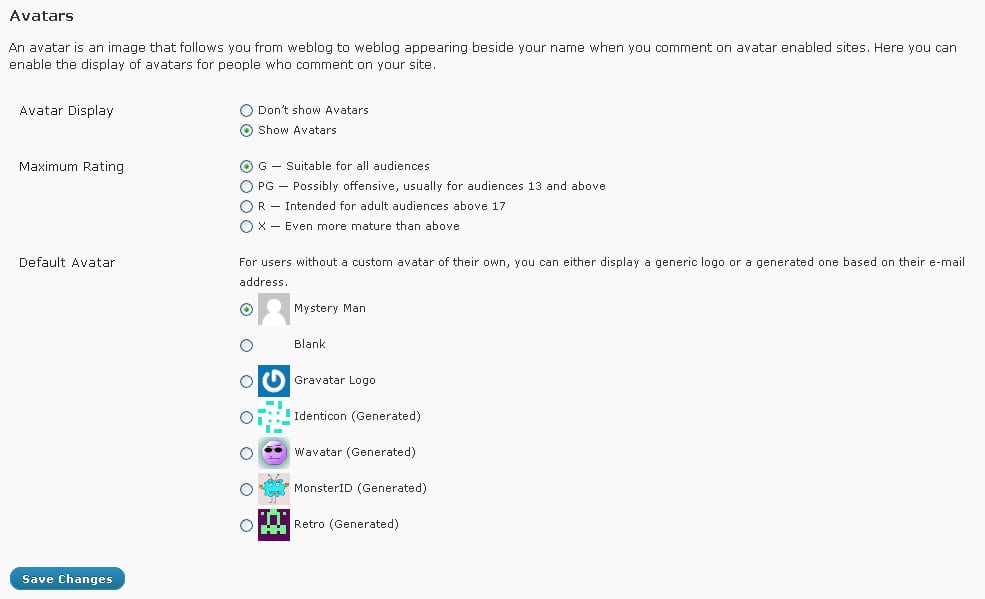 (You can click the image to get a bigger picture)
You also get the option to choose the image that’s used for comment authors who don’t have a Gravatar set-up or associated with their email address. The options include several generic settings (Mystery Man, blank, Gravatar logo), as well as 4 random identities: Identicon, Wavatar, MonsterID, & Retro.
Mystery Man, blank, and the Gravatar Logo will all show up like the icon that is displayed there (boring!) Identicons are geometric patterns that are computer-generated. A unique pattern will be assigned to each commenter’s e-mail address, so the same pattern will be used every time they comment. MonsterID uses the same concept but draws images of monsters instead of geometric designs. Wavatar assembles avatar images from a pool of pieces (faces, eyes, noses, hair), rather like assembling a Mr. Potato Head toy.
By using Avatars, you can give your readers/commenters a little bit of an identity when they comment on your blog.
Try it out – get your own avatar and see how it shows up when you leave a comment. Once you understand it, change up your settings on your blog!
For extra credit 😉 leave a comment below after you set up your avatar and see if it shows up!
Note: For the sake of clarity, this post was previously published and has been updated.





I too use the gravatar. Your post is interesting and informative! I have shared with my peeps!
Thanks! Having your image show up helps with your brand awareness as well – pretty soon people will see you everywhere! Thanks for stopping by, Phyllis!
Thanks Paul – Got ‘er done. Great instructions and easy to follow.
Have a great day!
Maggie
Wonderful! I can see your gravatar nicely!
Paul, what a great article. Really well-written. I use the Gravatar service and find it convenient. I’m posting your article for others, who may not be onto this yet.
Thanks, Kebba! Seeing that the functionality is built into WordPress (and other platforms), it only makes sense to have one! Thank you for stopping by again!
I’ve shouted myself hoarse about this in various groups I run, Paul. I’m not sure why people won’t take those few minutes to set this up!
If you want visibility, Corinne (as you know!), having an avatar is imperative, imho!
Thanks for stopping by!
I have bookmarked this and intend setting this up today:) My gravatar that is
Looks like you have one now! Great job, Lata!
Great info, I’ve only had my blog a little over a year and I can use all the help I can get. Do you see my avatar?
I see you there, Martha! Nicely done!
Always full of great information and tips! Thank you.
Glad I can help, Beth!
I totally agree with Gravatar Logo giving the readers some identity, also show you are not a spammer
Thanks for the info
All the best
Barry
Although it is no guarentee, having your image there is less likely to be a spammer. Keep in mind that if a spammer uses his/her email address (even if it is a dummy account that they created) they can still associate it with a gravatar! Be safe out there!
Gravatar makes communication more personalize. And I definitely use it.
Mukesh, we get to see your smile when you leave a comment!
Do I still get extra credit for commenting if I already have a Gravatar? LOL
Great advice – it really does make a difference to be able to see the person leaving a comment!
Obviously, I used the wrong email address in my comment!
Oh well, it just proves the point that using a Gravatar makes a big difference.
I see you there, Leslie!
If you use the email address that is hooked up to your gravatar! LOL – you still get plenty of credit, Leslie!
Thanks for the info. I signed up!
And I see your image show up!
I have my mug shot up but not from Gravatar. I did check it out but I’m staying with the same photo for now, so you can’t tell if I checked it or not! LOL
It is showing up here!
I’ve always wanted my comment (and Gravatar) to stand out– hoping to update mine with a professional head shot, soon. Great information about why they’re important. I’ve always been the type of person who likes to put a face with a name!
And you have one! Prefect!
Gravatars are wonderful – and FREE. I hate seeing the mystery man or other generic avatars. And being able to use different images for my different websites is wonderful. Have been using them for years.
You go girl!
Gravatar was the first thing I set up.Great tip to start blogging the right way.
Perfect! Nice job, Amrita.
Really well-written and great article Paul. This topic is so important that I’ll share it to my IM blog with a link back here. Thanks!
Thanks, Janice!
Howdy Paul. Next time you have the blog challenge, my intention is to see the start notice, and, well start 😉
I love Gravitar’s dashboard where all the avatars I’ve used are stored, kinda like an online scrapbook.
You got it! You will be notified of the next Ultimate Blog Challenge!
I’ve been using Gravitar for years and can attest that it’s great for branding and visibility. Informative article for those not in the know👌
It looks like this account does not have a gravatar set up for it!