
Password Protect WordPress Pages
There may be times when you want to publish and share a page with the world, but maybe simply limit the population of people who see it. For example, suppose you have a WordPress page with Directions to a Secret Retreat that you are holding for your Secret Society Members (ooh! Mystery! Intrigue! Suspense!) You can easily create the page as a regular page.
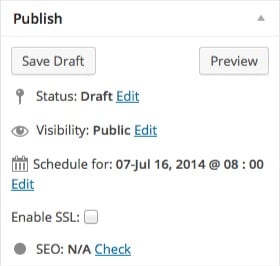
When you are finished with the post, click on the Edit link under Visibility area in the Publish Module (this is usually on the right side of the Post page)
 When you click on the Edit link of the Visibility area, you will see some choices available to you now. Since you want this to be a secret post that is only available to those people who have the password, click on the button that says, Password protected and you will be able to enter in a password:

Once you click on publish and try to view the page, you will see that you are prompted for a password:

Without a password, the general public will not be able to view the page! If you ever want to make it so anyone can view it without a password, simple go back in and edit the post and in the visibility area of the Publish area, click on Public (see the first figure above).



Paul, wow, thank you. I had no idea that cool feature was there, so easily done and undone.
It can come in handy!
What helpful information! There are times when this would be very handy but I never clicked on visibility! Thanks so much!
“The more you know….” 🙂