
Stop Showing PHP Warning Messages
Every once in a while, you may come across some error messages on your site that are caused by PHP.
Say WHAT?!?!
OK – Let me back up… WordPress is written using a language called, PHP (Technically, PHP stands for PHP: Hypertext Preprocessor – yes, the P in PHP stands for PHP…) Many times when your hosting account changes the version of PHP (when an update comes out), changes occur that cause a warning to be produced.
Most of the time these warnigns can be ignored (although it does mean that something is out of date and should be changed – this is usually something that the developer of a plugin or theme need to change). Do some research to ensure that it is not harmful and that you can turn them off without causing additional harm.
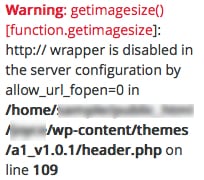
A warning could like this:
You can suppress these warnings from being displayed by changing some of the settings in your wp-config.php file. Edit this file and set WP_DEBUG to false in your wp-config.php file. To do this add the following line:
define('WP_DEBUG', false);
Most of the time, that will take care of what you are seeing.
In the event you STILL get these warnings, add the following lines:
ini_set('log_errors','On');

ini_set('display_errors','Off');

ini_set('error_reporting', E_ALL );

define('WP_DEBUG', false);

define('WP_DEBUG_LOG', true);

define('WP_DEBUG_DISPLAY', false);
This should do the trick!





Great tip for suppressing those annoying warnings! But, as a regular WordPress user, I can’t emphasize enough your suggestion to research the issue — hiding the warnings doesn’t mean the issue is fixed!
Exactly, Sean! It is kind of like when the oil light goes on! Taking out the bulb is ok SHORT TERM, but you want to fix the underlying problem! Usually, this is accomplished by getting an update from the developer. Thanks for stopping by!
This is helpful information. I never knew what PHP meant so learning all of this stuff is very useful to me in my journey as a blogger. The red background behind the note, however, makes the note hard to read, and you might want to switch to a lighter color.
Have a great day and thank you for all of the blogging advice that you send out regularly.
Thanks for the suggestion, and I will change that, Alice!