
Thesis: Remove “WordPress Admin” From Footer
Have you been searching for the code to remove the “WordPress Admin” link from the footer on your Thesis theme? Search no more!
- Log into your WP Dashboard /Admin Panel
- Click on the Thesis link in the left side menu. Then click on Design Options.
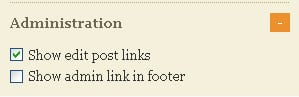
- Under the “Display Options” section on the left side, click on the Administration menu to open it up.
- Uncheck the “Show Admin Link in Footer” and hit Save.





Why yes I have been. Thanks! Knew it was there somewhere but I always forget where…. 🙂
Thanks mate,I wasted one hour till i found your post.
Thanks for that. I also spend an hour trying to find out how to delete that link at the bottom of the page. it worked! You got a FB “Like” from me!
I remove default wordpress admin from footer and again add wordpress admin with few text and links. Thanks for share.
Great idea, Rajib – that is valuable real estate at the bottom of the page! Nice to see you taking advantage of it!
man, I looked for that option for a long time.. not sure if I would’ve found it there. Thanks for taking the time to share it with the rest of us.
You are welcome!
Hi Paul,
Thank you for your smiling face on Google and your useful tip this morning…just upgraded to 1.8.5 and was wondering how to do that. Pleasantly simple!
Cheers
Sarah
Glad to help out, Sarah