
WordPress Upgrade Error – Bad Gateway
I received a “Bad Gateway” error when I went to upgrade one of my WordPress sites.
I hate to admit this, but I will – full disclosure time! You probably already know that I have a lot of sites. A Lot. So many that I actually forgot about one (are there more out there that I forgot about?!?!) Within the past 6 months, I have become more diligent with tracking and updating my sites; this will be a topic for another post at another time.
So I remembered about this site and realized I had not performed maintenance on the site in a while – well it must have been a while if I forgot about it! I logged in and discovered a few out dated plugins as well as WordPress being out of date!
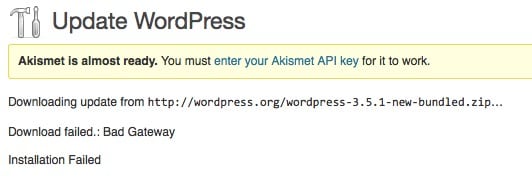
I started by updating the couple of plugins that were out of date. Everything was fine. When I then updated WordPress, I received the following message:

Download Failed.: Bad Gateway. Installation Failed. WHAT?!?! In all the years I have been upgrading WordPress, I have never encountered this issue.
I searched around for a description of what might have happened. Nothing clear cut was found. so, I did the next logical thing… I tried to upgrade it again.
And it worked!
What happened? I am not sure, and I don’t really care since the second time worked!
Bottom line – if this happens to you, try it again! If it continues to happen, check with your hosting company.






I had this error today also.
I reckon it was the server at WordPress was having a bit of a lie down – maybe temporarily overloaded or something like that.
As you say, trying again sorted it.
Hi Rex – Glad that you were able to resolve it simply by trying again!
Just came across this via Google as I had the same error this morning. Glad to know it’s nothing serious. I’ll stop panicking now and try again.
Oh thank god for you! Just had the same exact thing happen, did what you said. Worked just like it did for you. Yay!!! Thanks for posting this.
Seems a bit scary when it does not go smoothly – glad this helped, Drexel!
Didn’t work for me until I logged out and logged back in.
Glad you got it to work, Cindi!
I just had this problem, found and read your post and then waited a while and then tried again and it worked. Thanks very much for this hint.
Glad it helped, Sarah!
Go figure. never had this in all my years with WP but got it today with WP 4.0. rety worked. thanks.
🙂 Perhaps they were bombarded with requests to upgrade to v4.0 since it came out today. Glad I could help you out, Cory!
Thanks for saving me time! Had this error yesterday, read this post, and just waited. Retried today and it worked 🙂
Glad it helped, Guido!
This is literally the only page on Google with this error that I could find and apparently, this issue is still going on almost a decade after it was first discovered because it just happened to me (WP5.8.3). Had to retry maybe a dozen times before it finally took. Just updated, though. Thanks!
You are welcome, John!