
Delete WordPress Images
After a session of the WordPress Inner Circle Academy last night, I went to remove an example that I created to teach a lesson. One of the questions that was asked dealt with adding a click-able image to a link within a widget. In order to demonstrate an easy way to do this (very easy by the way), I needed to upload an example image to the Media Library. I continued on with the necessary steps and the lesson was well received.
Now that the lesson is over, I no longer need that on the site. I deleted the widget. I knew that simply deleted the widget would not also delete the image in the Media Library, so I mozied on over to the Media Library.
I was surprised to see that I actually had a couple of other unused images:

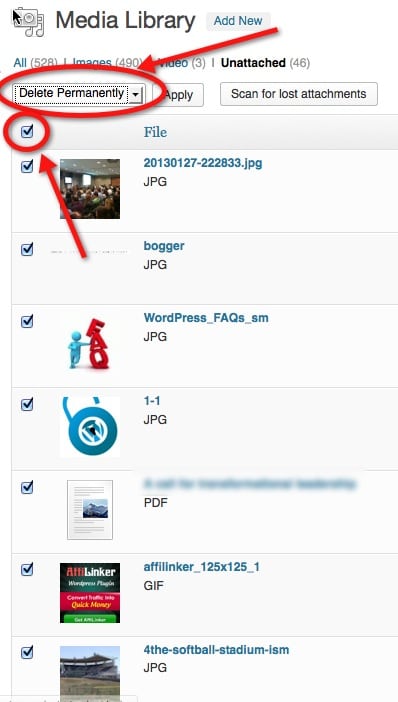
There is a quick way to find ALL the unused (or Unattached) images that are in your library – at the top of the page there is a nice filter that allows you to click on it to them all:

You can see that I have 46 images in my Media Library that are not being used on my site. By clicking on the Unattached Link, I can get a list of all the unused images. On this screen, I can click the ‘Select All’ check box and change the ‘Bulk Actions’ to ‘Delete Permanently’

The next step is to simply click on the ‘Apply’ button and your unused images which are unnecessarily taking up space on your website (as well as each backup copy that you make) will be reclaimed.





Now I know exactly where to go when I’m having issues with my blog…HERE!
I’ve never really considered going through and deleting any unused images…Totally makes sense! A little blog spring cleaning, if you will.
Welcome, Donloyn! Glad you found us – you have questions, we have answers!
This is a handy tip that I’ve helped others with in the past. Great tip for beginners!
Great for sharing it, Emiliy! I guess I posted this a little to late for you 🙂 Hopefully if you poke around on the site, I can share a tip that you did not know.
Thanks for stopping by!
I do a lot of work with realtors who upload a lot of images for each listing. When the listing is deleted, the images are left just taking up space. Deleting them manually just isn’t an option. I found DX Delete Attached Media in the WP repo. Here’s a direct link: http://wordpress.org/extend/plugins/dx-delete-attached-media/
It’s like a Roomba for your old images 🙂
Thanks for the suggestion, Darryl! I will check it out and write a post about that plugin. Thanks for stopping by!